Connecting databases to Hasura GraphQL engine
Introduction
From v2.0.0 onwards Hasura GraphQL engine allows connecting to multiple databases and build a unified GraphQL API
based on the database schemas.
Connect a database
In versions v2.0.0 and above, databases can be connected and removed dynamically without having to restart the GraphQL
engine instance via the console / metadata APIs / CLI:
- Console
- CLI
- API
Head to Data -> Manage -> Connect database
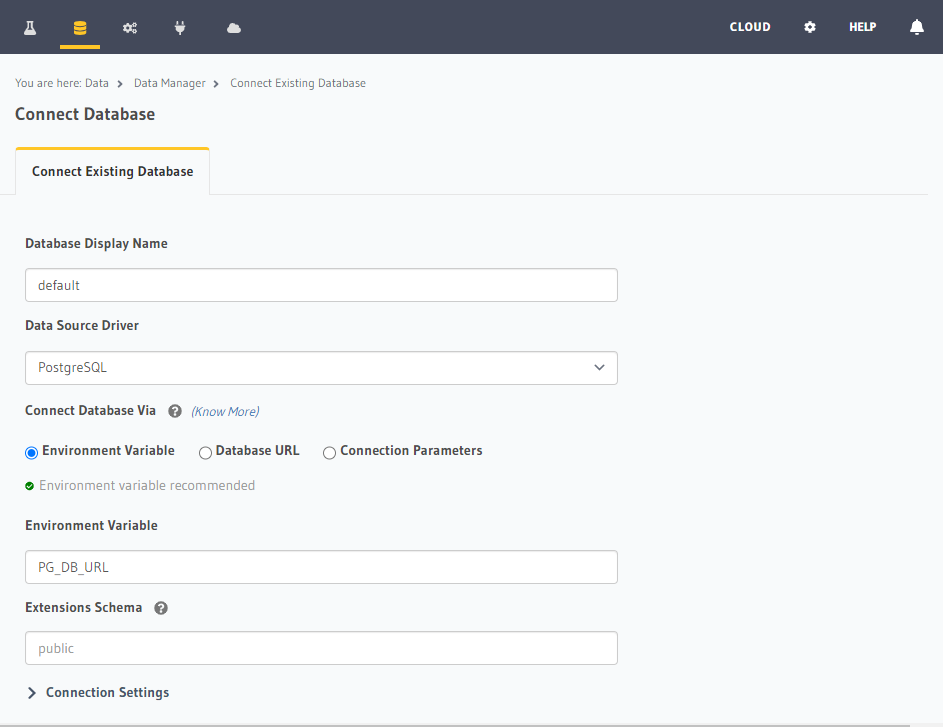
In your config v3 project, head to the /metadata/databases/databases.yaml file and add the database configuration as
below:
- name: <db_name>
  configuration:
    connection_info:
      database_url:
        from_env: <DB_URL_ENV_VAR>
      pool_settings:
        idle_timeout: 180
        max_connections: 50
        retries: 1
    tables: []
    functions: []
Apply the metadata by running:
hasura metadata apply
Depending on the type of database, you can add a database using the sources metadata API.
For example:
POST /v1/metadata HTTP/1.1
Content-Type: application/json
X-Hasura-Role: admin

{
  "type": "pg_add_source",
  "args": {
    "name": "<db_name>",
    "configuration": {
      "connection_info": {
        "database_url": {
          "from_env": "<DB_URL_ENV_VAR>"
        },
        "pool_settings": {
          "retries": 1,
          "idle_timeout": 180,
          "max_connections": 50
        }
      }
    }
  }
}
- You can connect to databases either using env vars or by using their raw connection string/parameters. It is recommended to use env vars for better security (as connection details are part of Hasura metadata) as well as to allow configuring different databases in different environments (like staging/production) easily.
- A Postgres database can be connected using the
HASURA_GRAPHQL_DATABASE_URLenv var as well in which case it gets added automatically as a database nameddefault
For a quick start with Hasura, you can also create a Postgres database with Neon from inside of Hasura Cloud. For more information, see Connect new/existing database on Hasura Cloud.
You can connect different Hasura instances (i.e. instances with different metadata) to the same database as long as there are no Event Triggers in any of the metadata. Event Triggers store their data in the underlying database and hence different instances acting on the same data can cause undefined behaviour during run-time. This should not be a problem if the Hasura instances have the same metadata.